We missed Finale, too. So we built apScore from the ground up for modern 64-bit Macs and Apple Silicon—to keep working with the native score files we already knew and loved.
New code. Trusted workflows. A new life for your scores.
$199one-time purchase · native Mac app · includes 12 months Online
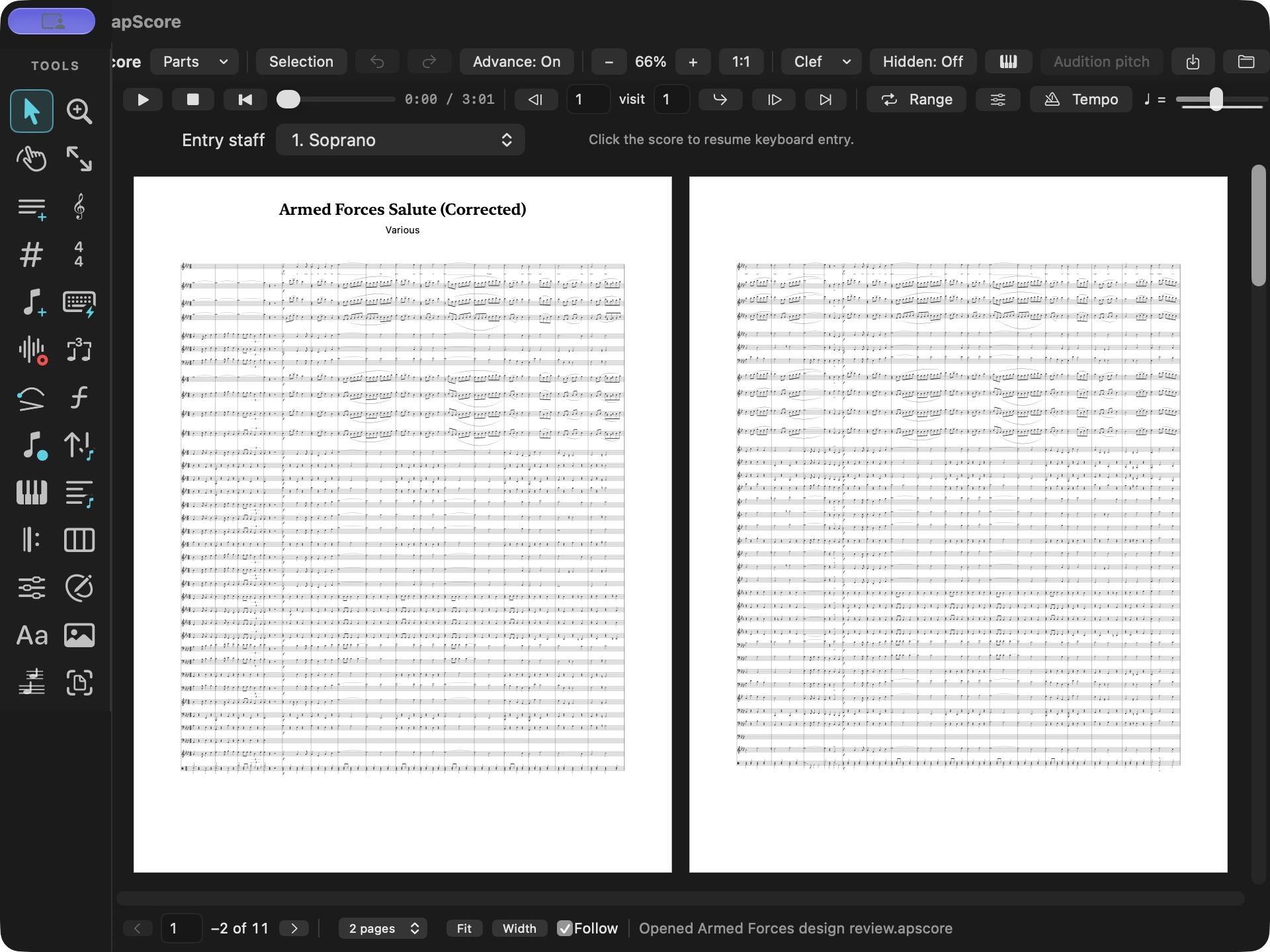
A full concert-band arrangement, open in apScore. Armed Forces Salute shows the scale and detail of a real ensemble score. View full size ↗
WE MISSED FINALE, TOO
Built anew. For music worth keeping.
New code. Familiar ways of working.
We built apScore because we wanted to keep composing, arranging and revising the music in our Finale files. Years of work deserved a future—and the familiar notation processes we trusted deserved a place in a modern Mac application.
Starting from the ground up gave us a new codebase for 64-bit macOS and Apple Silicon. The goal was personal: open our native scores, put our hands back on the music and keep going.
Bring a Finale .musx score into apScore and save your next chapter as .apscore. Continue the arrangement, refine the engraving, prepare linked parts and print music for the people who will play it.
That new life reaches back decades, too. Legacy .mus import brings supported older Finale projects into an editable score. Correct what needs attention, save it as .apscore and let the music carry on.
A NEW LIFE FOR YOUR SCORES
The music is still yours.
Your notes, rhythms, parts, lyrics, chords and supported markings become music you can work with again. Revisit an old piece, make a new arrangement or write the next one.
apScore reads the common MIDI and notation elements in supported music files and brings them into its own score document. Your original stays unchanged.
Legacy MUS versions vary. Older files can need hand-corrected engraving; file-specific import notices identify items to review.
01
Open your score
Choose the music file through the normal Open window.
02
Make the next revision
Edit the music, check the parts and refine the page.
03
Save as .apscore
Reopen your working document, rehearse, print and share.
OTHER NOTATION FILES ARE WELCOME, TOO
Bring the music you already have.
A single Open chooser. A native working document. A way forward for scores from different stages of your musical life.
Music file import and exchange in apScore
Your file
What you can bring into apScore
Finale .musx
Editable music and supported score information, markings and linked parts. Continue working and save as .apscore.
Legacy Finale .mus
Recover supported older scores—including decades-old projects—then revise the music and engraving in apScore.
Sibelius .sib
Supported notation, multi-staff parts, lyrics and page information. Direct import is experimental and varies by file version.
MuseScore .mscx.mscz
Supported music content from uncompressed and compressed MuseScore documents.
MusicXML .xml.musicxml.mxl
A notation interchange path from many scoring applications. Import and export supported musical information.
MIDI .mid.midi.smf
Transcribe supported melodic and drum tracks into editable staves. Export a part or a multitrack MIDI score.
Dorico .dorico
Experimental direct import of supported content. MusicXML offers another exchange route.
Printed music .pdf
Recognize notation with separately installed Audiveris, compare the original pages, correct the music and save it as .apscore.
apScore .apscore
Your native working score, including supported layout, linked-part settings, notation and playback choices.
Import reads the musical and notation elements supported by each reader. Source versions and unusual notation can require review or correction. MIDI contains performance events, not finished page engraving; PDF recognition is a starting transcription to check and edit.
A DEDICATED NOTATION WORKSPACE
Small idea. Full arrangement. Room for both.
The tools span composing, engraving, linked parts, practical charts, rehearsal, mixing and teaching. Here is what that means in daily work.
01
Composition & note entry
Start with the music.
Step and fast entry
Enter notes and rests with the palette or laptop keyboard. Choose pitch, accidental, octave, duration and dots.
Pitch and rhythm editing
Revise individual notes and chord tones; change supported note and rest durations with Undo and Redo.
Musical structure
Work with voices, clefs, key signatures, time signatures and pickup measures. Insert or delete measures as an arrangement develops.
Selection and transposition
Select staff and measure ranges, transpose supported passages, and copy or paste supported notation.
Score setup and templates
Begin with an ensemble, a blank score or personal stationery. Save a score as a reusable template.
02
Markings & expression
Make the phrase your own.
Dynamics and articulations
Add dynamics and articulations; revise supported imported markings and their playback settings.
Slurs, ties and hairpins
Shape phrases with native slur and hairpin editors, and work with supported imported ties and curves.
Define repeat regions and alternate endings; navigate measures and performed visits for rehearsal.
Text, graphics and ossia
Place titles, composer information, text, graphics and small musical examples on the page.
03
Score, parts & engraving
One composition. Every player.
Linked instrument parts
Keep music linked to the full score while giving parts their own page layouts and marking positions.
Imported Finale parts
Bring supported MUSX linked parts into the score, retain their relationship to the music, and continue working in .apscore.
Condensed layouts
Build supported two-staff condensed layouts, share unisons, and choose separate voices or staves for a passage.
Page geometry
Set paper size, orientation, margins, music size and measures per system. Read a full page or a multi-page spread.
Engraving adjustments
Adjust note positions, stems and supported marking placement. Print the full score or an individual part.
04
Lyrics, charts & fretted instruments
From a song idea to the bandstand.
Lyrics on the score
Assign syllables to notes and revise verses, hyphens and melisma endpoints.
Working musician charts
Build flowing lyric/chord charts with title, key, tempo, Intro and Outro sections, repeated-section cues and capo options.
Chord names and numbers
Choose chord names, Roman numerals or Nashville numbers to suit the rehearsal or gig.
Linked TAB
Create supported linked tablature from a pitched staff; choose tuning and capo, then revise string and fret assignments.
Playable input surfaces
Use a piano keyboard or fretboard for guitar, baritone guitar, four-, five- or six-string bass, ukulele, banjo and mandolin. Ukulele choices include soprano, concert, tenor and baritone.
05
Playback, sound & mix
Hear the arrangement take shape.
Rehearsal transport
Play, stop, rewind, jump to a measure, set a loop or range, and follow playback across score pages.
Tempo and swing
Build a tempo map and use adjustable eighth- or sixteenth-note swing without rewriting the notation.
Staff mixer and master
Give written parts their own sound, level, pan, mute and solo controls, with a stereo master and a floating mixer option.
Samples and artistpro effects
Use the installed sample library, assign supported instruments and add installed artistpro Audio Unit effects. Attach an audio performance beside a written part.
Per-note expression
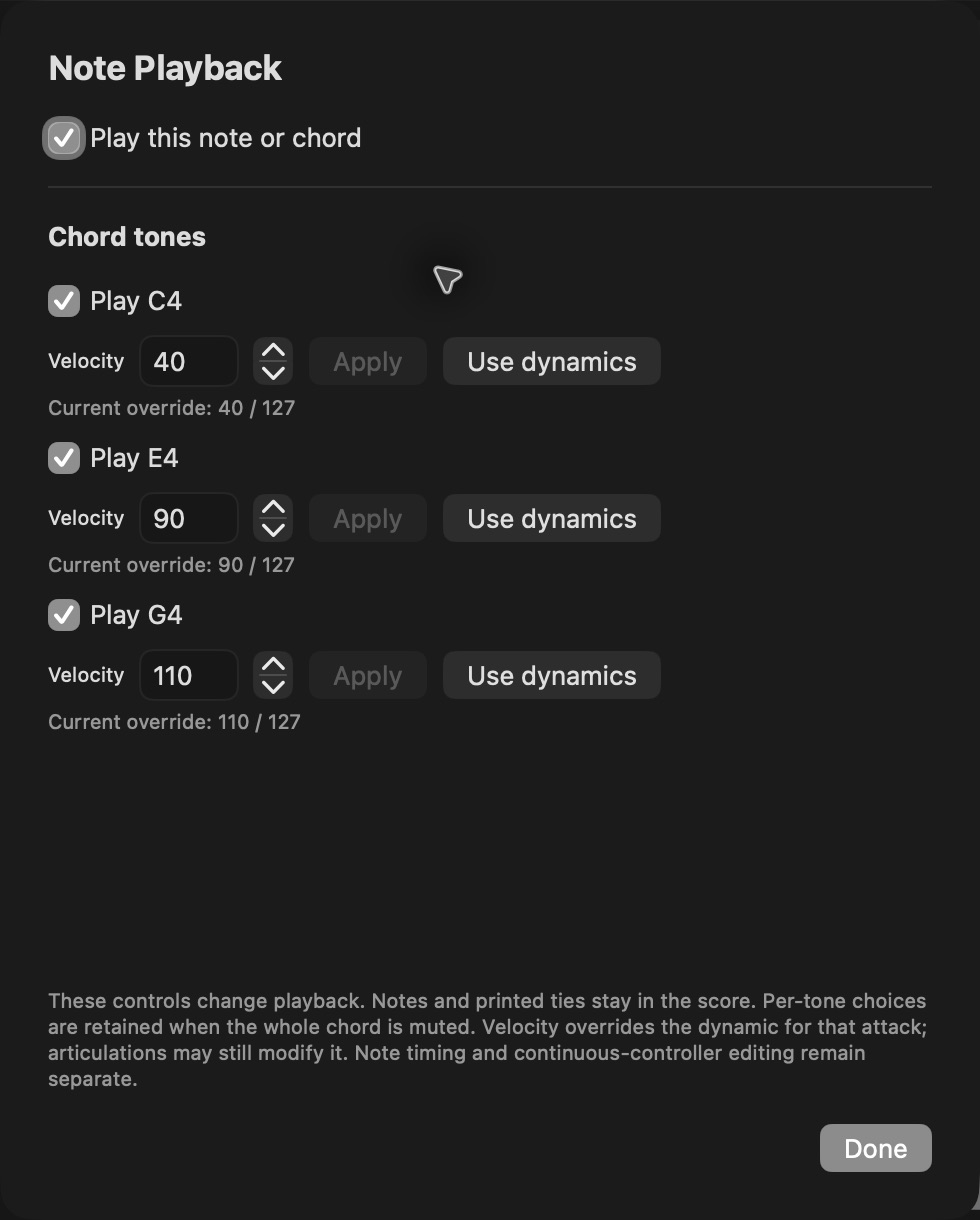
Inspect individual chord-tone velocities and playback switches; edit supported expression, volume and pan controllers in musical time.
Audio and MIDI output
Bounce a mix to WAV or MP3, or export a selected MIDI part or a multitrack MIDI score for a DAW.
06
Education, print & exchange
Music that leaves the screen.
Teaching materials
Add instructional text, blank answer staves, analysis brackets and nonprinting teacher comments. Reuse your worksheet as a template.
Musical excerpts
Export a selected page area as a PDF, SVG, PNG or TIFF for a handout, lesson or publication.
Print and PDF
Export full scores and parts to PDF, with progress and notation checks that identify items needing attention.
PDF music recognition
Turn printed notation into editable music with separately installed, free Audiveris recognition. Compare the source PDF, correct the result and save the corrections in .apscore.
apStudio handoff
Use Send to apScore or export .apscore from apStudio for dedicated notation work. Bring the revised file back into the session and review the changes.
Find help quickly
Search commands and settings, read tooltips and use the built-in workflow help. Recovery copies provide a route back after an interrupted session.
Feature scope depends on the musical content being edited. Imported source notation and advanced attachments can require their dedicated editors. The in-app help describes supported operations and import notices.
LOOK CLOSER
Real music. Real apScore.
Actual application captures and engraved output. Open any image at full size to see the notation.
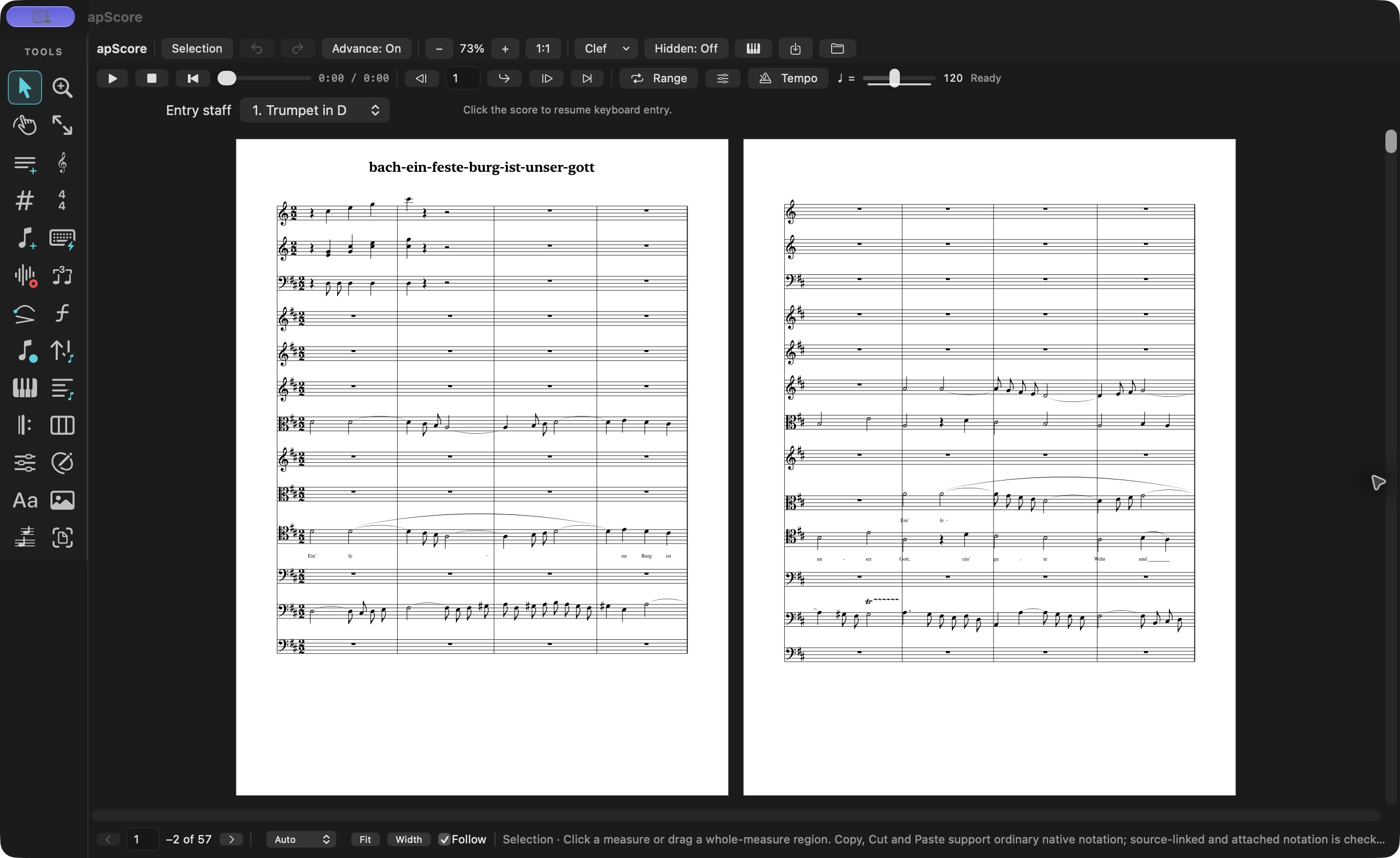
A Bach ensemble score brought into apScore from a Sibelius file: multiple staves, instrumental and vocal music, lyrics and phrase markings. View full size ↗
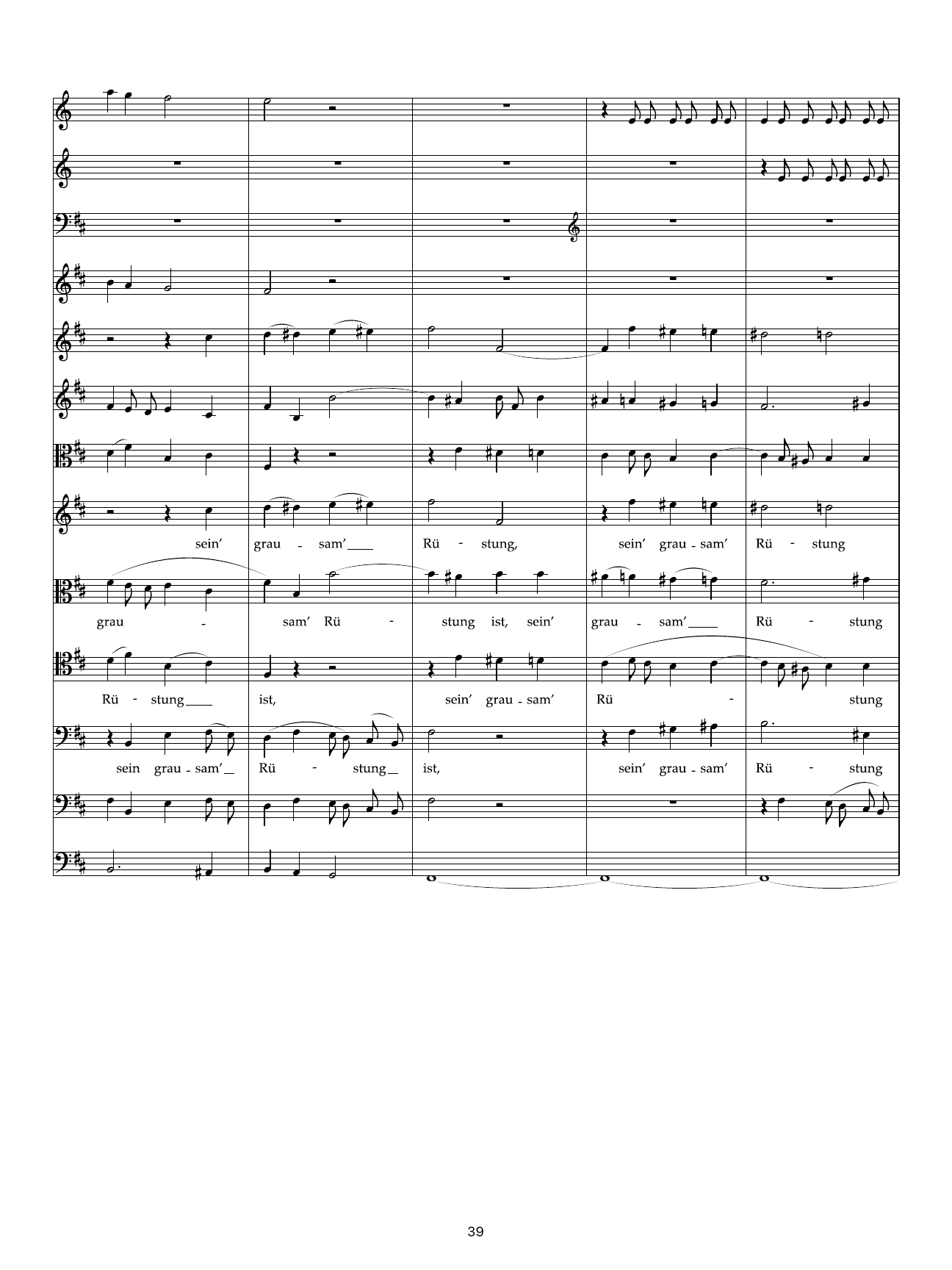
Detail from apScore’s exported Bach score, page 39: vocal lines, syllables, hyphens, extensions and instrumental writing. This is engraved output, not a mockup. View full size ↗
THE DETAILS MATTER
A score is more than its notes.
Voices overlap. Clefs change. Lyrics extend across a phrase. Players need parts they can read, and you need a document you can revise.
apScore brings those musical elements into a dedicated workspace, with tools to inspect the music and refine the result.
Inside Note Playback: individual chord-tone switches and velocities, with the option to follow score dynamics. View full size ↗
THE SCORE AND THE SESSION
apScore for the page. apStudio for the record.
Use apStudio’s MIDI and DAW-level notation tools while building a session. When you want the dedicated scoring workspace, choose Send to apScore or export an .apscore document.
Work on the notation, save the revised score and bring it back to apStudio. The exchange is file-based, so you can review the changes before applying them to the session.
Do I need Finale installed to open a Finale score?
No. Open supported MUSX and legacy MUS files directly in apScore. Keep the original file; save your ongoing work as .apscore.
Can apScore help with very old .mus files?
Yes. Legacy import has brought decades-old Finale projects back into an editable workflow. File versions differ, and some recovered scores need engraving corrections. The useful result is music you can work on and save again.
Can I start a completely new composition?
Yes. Begin with Score Setup, a blank score or a template, then enter notes, create parts, add markings, rehearse and print. Import is one way in—not the whole app.
Can I turn a PDF into editable music?
Yes, using the free, separately installed Audiveris recognition app. Recognition runs locally. Review the transcription against the source PDF, correct notes and rhythms, and save the result as .apscore.
Is this the full browser version of apScore?
This page presents standalone apScore for Mac. Browser apStudio has DAW-level notation and score exchange; dedicated notation and engraving work belongs in apScore.
How do I download and update apScore?
Through artistproMusic License Manager. Sign in to the account with apScore access, then install or update from your product library. Product installation and updates are managed in License Manager.
YOUR NEXT SCORE STARTS HERE
Keep writing. Keep your music.
Install and update apScore through artistproMusic License Manager.
Get apScore for Mac
$199one-time purchase · native Mac app · includes 12 months Online
Own native apScore and receive 12 months of apScore Online. Online is in development and not available yet. For purchases before launch, your 12 months begin when Online launches. No recurring subscription.