START WITH YOUR BOARD
Velcro Underground · $49
The pedalboard and built-in tuner, plus Green Drive, Analog Delay and Phase Shift. Build your signal chain and save your setups.
ARTISTPRO MUSIC
Compose and arrange in apScore. Record, edit and mix in apStudio. Find instruments and effects that give your music its voice.
Notation. Recording. Instruments. Effects. Learning.
Choose the tools for the way you make music.
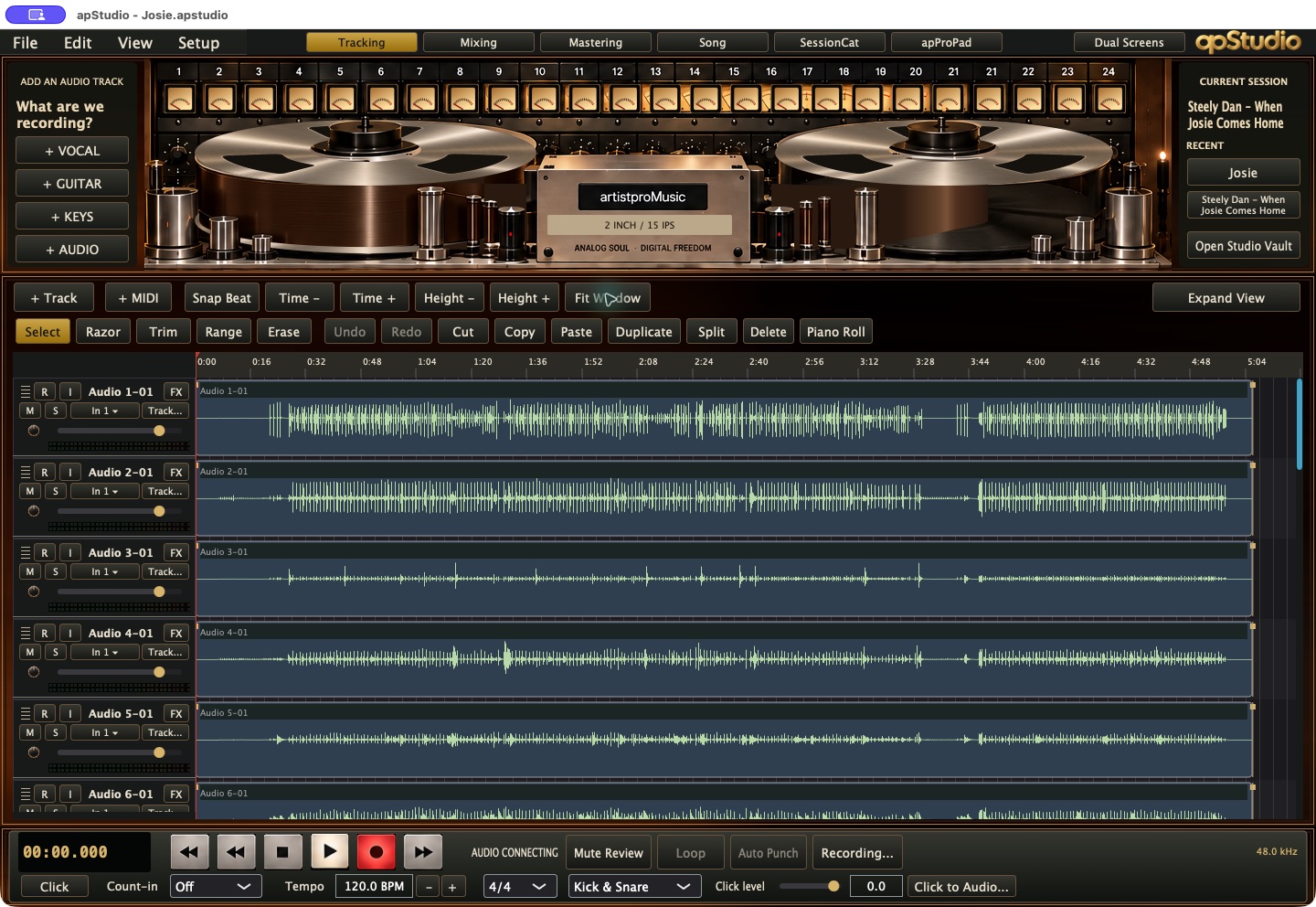 apStudio for Mac · Take the session from idea to mix ↗
Keep writing. Bring your Finale and other supported scores into a dedicated Mac notation workspace. $199 one-time purchase; includes 12 months Online.
Explore apScore →02 / RECORDINGRecord, edit and mix with a studio on your Mac or a DAW in your browser.
Explore apStudio →03 / SOUNDBuild your sound with artistpro instruments, effects, guitar rigs and studio collections.
Find your sound →04 / IPHONE & IPADTake artistproMusic with you. Explore The Keystone for iPhone and iPad.
Explore iOS Apps →FIND YOUR NEXT SOUND
Choose a collection. Explore its sound. Or get them all with Complete.

THE ROGER NICHOLS COLLECTION
Wendel Jr. in a plugin for the first time. The all-new Wendel-izer. Fifteen plugins, all-new 64-bit code for Apple Silicon Macs.

RUTLAND SOUNDWORKS LTD PRESENTS
The sound that made us all get guitars. And put the kettle on. Fourteen products. An extraordinary amount of character.
$199 Enter Shabby Road →
GUITAR · AMPS · PEDALS · RIGS
Revolver. Psychedelicatessen. A whole board of possibilities. Start with Velcro Underground, a tuner and three pedals for $49. Build from there.
Find your guitar sound → Expanded board shown; extra pedals sold separately.MAKE SOMETHING WITH IT

APSTUDIO + APSTUDIO ONLINE
A studio on your Mac, with SessionCat built in. A DAW in your browser. Pick the way you work.
Explore the studios →FOURTEEN COURSES · $99/YEAR
Recording techniques, production and the music business. Learn something, open a session and put it to work.
Explore the courses →HOW WE BUILD
At artistproMusic, our plugins, software, and iOS apps begin with the history, schematics, and electronic construction of the hardware they model—from instruments and microphones to speakers and other audio tools.
We develop these models using Nomad, our custom AI-assisted engineering system, and spend extensive time manually testing every product and every setting.
Explore how we build →THE COMPLETE PLUGIN COLLECTION
apStudio for Mac and the desktop plugin collection for $399 once. Keep your plugins, with twelve months of updates and new plugin releases included. Includes 12 months of apStudio Online from purchase. apScore, iOS apps and courses are separate.
VELCRO UNDERGROUND
Make the guitar move. Revolver brings rotating-speaker motion; Psychedelicatessen adds reverse phrases, loops and tape effects. Start your own board for $49, then choose the pedals that make it yours.
START WITH YOUR BOARD
The pedalboard and built-in tuner, plus Green Drive, Analog Delay and Phase Shift. Build your signal chain and save your setups.
EXPAND YOUR BOARD
Pick 3 for $19, 6 for $29 or 12 for $49. Add all 27 remaining pedal licenses for $79. The starter board plus every catalog pedal license: $613 purchased individually, $128 together.
The native board integrates 28 pedals including its tuner. VU Digital Delay, VU Pitch Treadle and VU Shimmer run as separate apps and plug-ins.
Expanded setup shown above. The $49 purchase includes the board, tuner, Green Drive, Analog Delay and Phase Shift. The $99 Pedal Collection is a separate purchase.
HOW WE BUILD
At artistproMusic, our plugins, software, and iOS apps begin with the history, schematics, and electronic construction of the hardware they model—from instruments and microphones to speakers and other audio tools.
We develop these models using Nomad, our custom AI-assisted engineering system, and spend extensive time manually testing every product and every setting.
Explore how we build →Try browser-compatible plugins in apStudio Online. Start with the Street Life multitrack session.
RUTLAND SOUNDWORK LTD PRESENTS THE SHABBY ROAD COLLECTION
There was a time when getting these sounds required a large studio, several expensive instruments and a man who insisted the microphone had been moved.
Shabby Road considerably reduces the number of men required.
Meet the S.Road-73, Teallotron and Miss Meals. Introduce them to the console, tape and chamber tools. Make something worth turning up.
Fourteen products. $199. No need to book the room.
THE ROGER NICHOLS COLLECTION
Wendel Jr. In a plugin. For the first time.
An all-new Wendel-izer, developed from Roger’s notes and brochure. EQ, dynamics, limiting and analysis tools. Three new processors carrying his ideas forward.
Fifteen plugins. All-new 64-bit code. Apple Silicon Macs. $199.
Put them on a real multitrack session. Hear what happens. Then put them on yours.
INDIVIDUAL PRODUCTS
CHOOSE THREE PLUGINS
Choose three eligible individual plugins priced $39–$59. The bundle price applies automatically when it saves you money.
YOUR FIRST INDIVIDUAL PURCHASE
Use WELCOME15 for 15% off individual paid plugins and rigs. Collections, courses and plans excluded. Offers don’t stack.
COLLECTION UPGRADES
See how an owned collection could reduce your complete-edition price.
APSTUDIO EDITIONS
BROWSER DAW · SUBSCRIPTION ACCESS
Record, compose, edit and mix in your browser. Build audio and MIDI arrangements, play virtual instruments, step-enter a drum beat, revise staff notation and export your work. Use your own projects with an eligible account, or explore the supplied Street Life demo.
MACOS DESKTOP · ONE-TIME PURCHASE
Record and edit audio and MIDI in a native Mac studio. Mix on the included consoles, work with installed artistpro plug-ins, and finish your stereo master. Show the tape deck when you want it; hide it for a full-height workspace.
DESKTOP · BUY ONCE
Your recording studio, from the first take to the finished stereo master. Record and arrange audio and MIDI, edit performances, choose the best phrases from your takes, and mix with built-in apRange console processing and a tape system for multitrack playback and mixdown. SessionCat connects remote performers to your session.
BROWSER · SUBSCRIBE
Your browser production workspace for original recordings, MIDI compositions, drum patterns and mixes. Sign in for the save, reopen and export access included with your plan. The free Street Life demo is a separate supplied-content experience.
DESKTOP + ONLINE + LEARNING
Connect desktop production, browser access, the plugin catalog and the course library in one subscription.
Annual plans are charged annually. Subscription access lasts for the paid term. Some online workflows require a native companion. Storage and final service terms must be set before launch.
APSTUDIO ONLINE · YOUR BROWSER RECORDING STUDIO
A browser DAW for making your own music: recordings, MIDI parts, drum patterns, staff notation, instruments, effects and a mix you can take with you.
Record through your browser’s microphone or selected audio interface. Import audio, move and trim clips, split passages and shape fades. Use timeline zoom and track-height controls to see the performance.
Create instrument parts and open MIDI patterns in the piano roll. Draw and revise notes, timing, duration and velocity; choose the sound for each part.
Start with a loaded 16-pad drum kit. Step-enter hits or use Record beat, then work with one MIDI pattern in Track view. Resize the drum pads without adding more pads.
Balance channel and master faders, pan parts, add buses, use sends and returns, and shape the mix with EQ, dynamics and automation. Resize or detach the console to suit the screen.
Use the browser versions of artistpro instruments and processors. Build insert chains and revise their controls inside the session. Desktop AU and VST3 plug-ins run in the native app.
Open supported notation files, review the score and revise notes with DAW-level notation tools. Use .apscore exchange and Send to apScore for dedicated engraving and orchestration.
Keep your work as a saved project or a portable .apstudio session. Exchange supported audio and MIDI sessions with native apStudio, keeping the notes and instrument assignments with the project.
Use Export / Bounce for a processed stereo mix. Save the editable session as well, so you can return to the tracks, revise the arrangement and make another mix.
Production access: connect the account with your Online subscription, All Access plan or eligible course access to work with your own files and use the save/export features available to that account.
Free plug-in demo: try the artistpro collection on the supplied Street Life multitrack session. The demo does not save, export or accept your own recordings.
A multitrack arrangement in the current browser editor.
Channel inserts, pan, faders and the stereo master in the browser.
Sixteen assigned drums, step entry and pad-size controls.
Choose from the browser instrument collection for MIDI parts.
Edit, Mix and drum-view captures are from the current supplied-content browser demo. Your own projects open in the subscriber studio. Recording needs browser microphone permission; MIDI controller support depends on the browser.
NATIVE APSTUDIO · MACOS WORKSPACES
Full-height editing and mixing with the deck hidden. Notation, sixteen-pad drums and stereo mastering. These are actual captures of native apStudio.
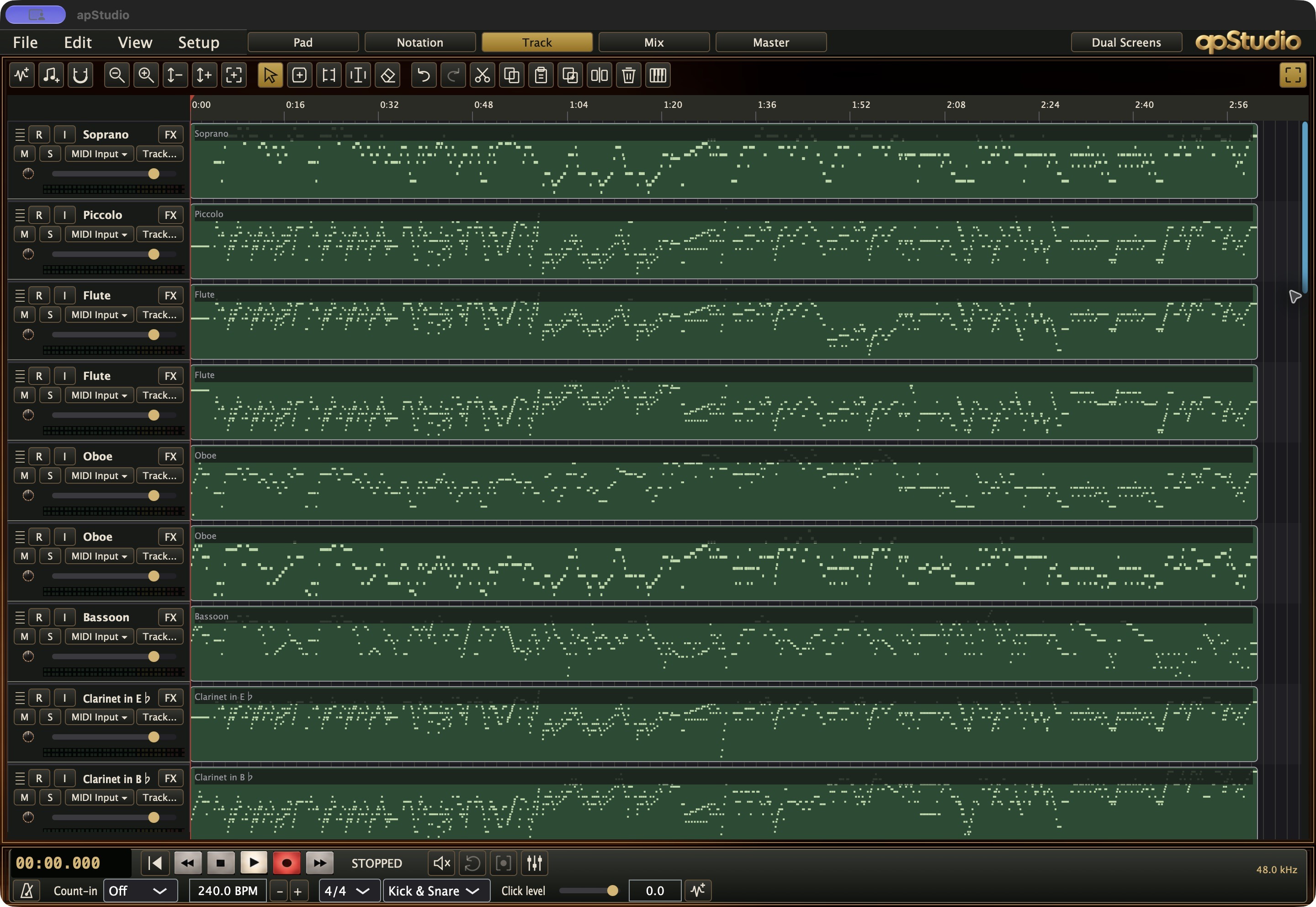
A full arrangement in the Track editor, with MIDI parts, editing tools and transport visible.
View full size ↗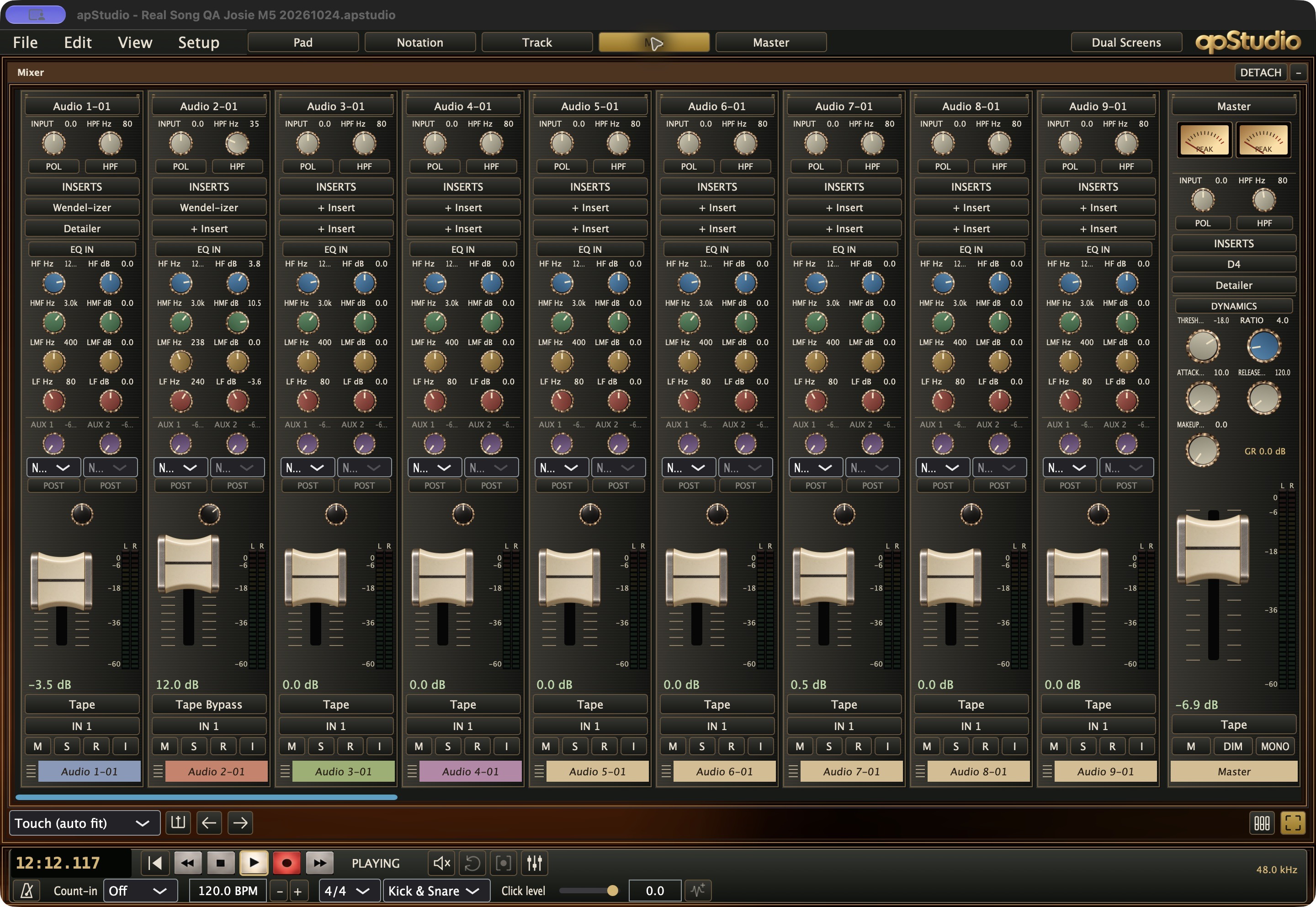
The expanded console: full channel strips, EQ, inserts, sends, faders and stereo master.
View full size ↗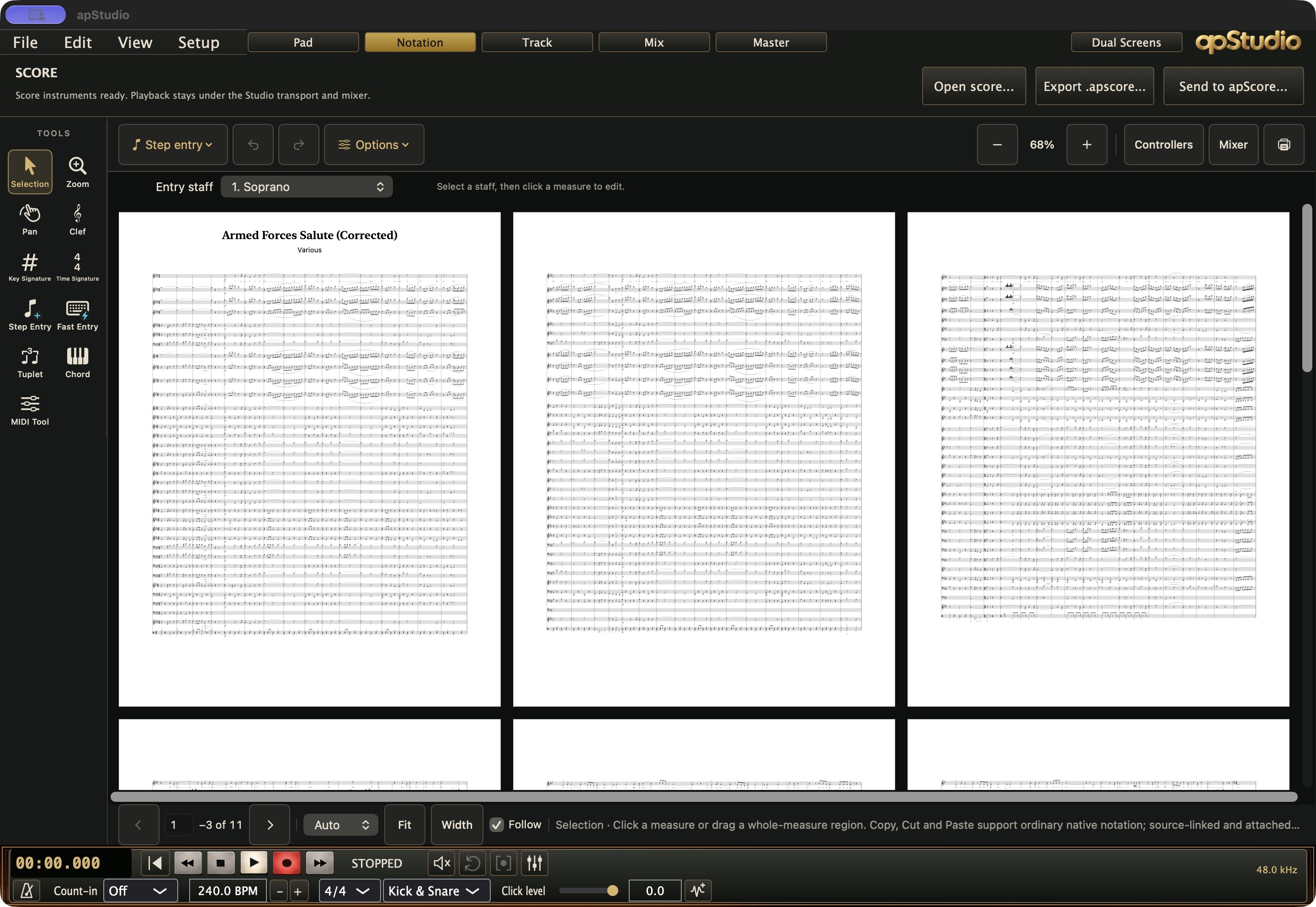
Armed Forces Salute in the DAW notation workspace, with Export .apscore and Send to apScore.
View full size ↗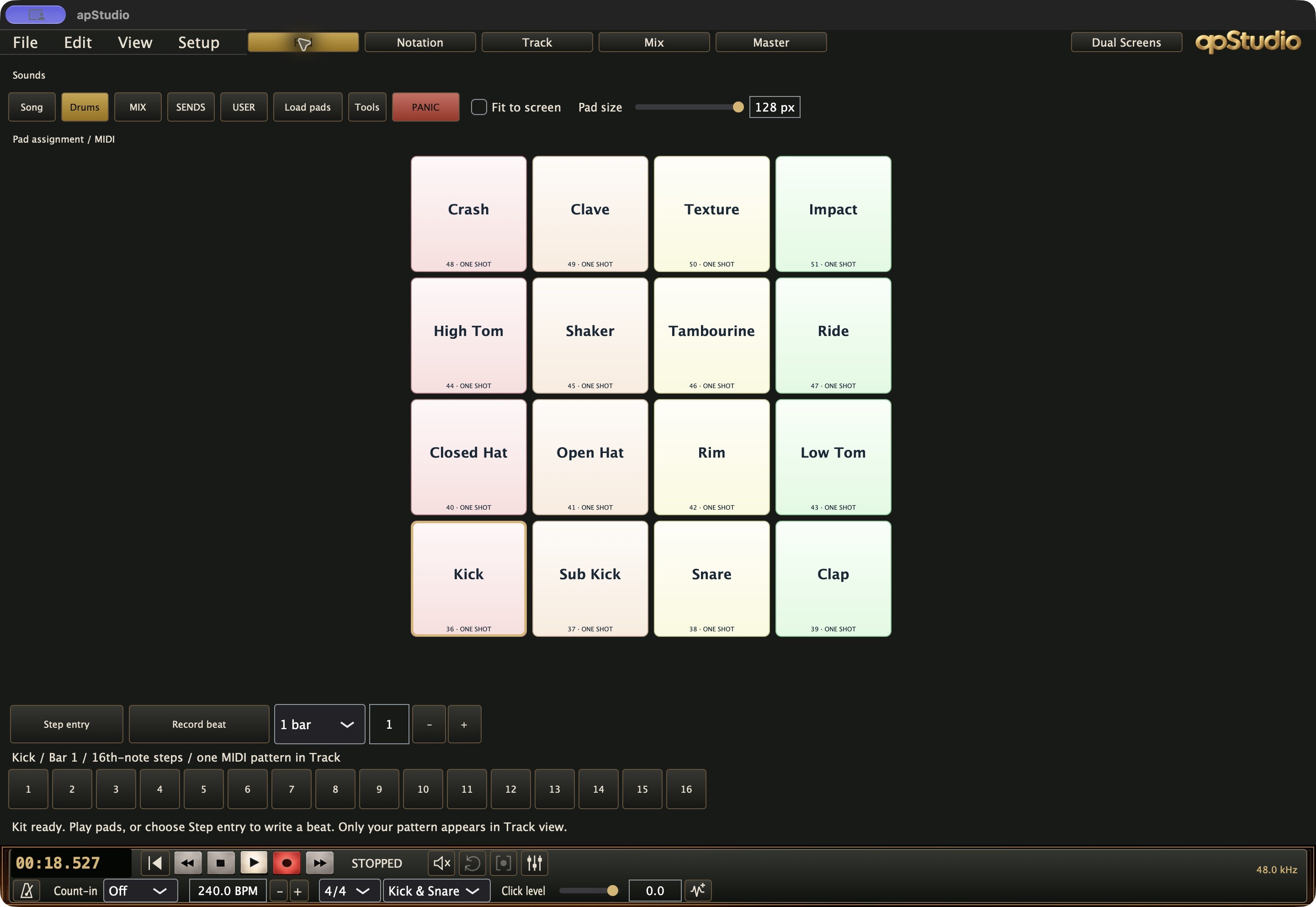
The loaded 4 × 4 drum kit, pad-size controls and step entry for a MIDI pattern in Track view.
View full size ↗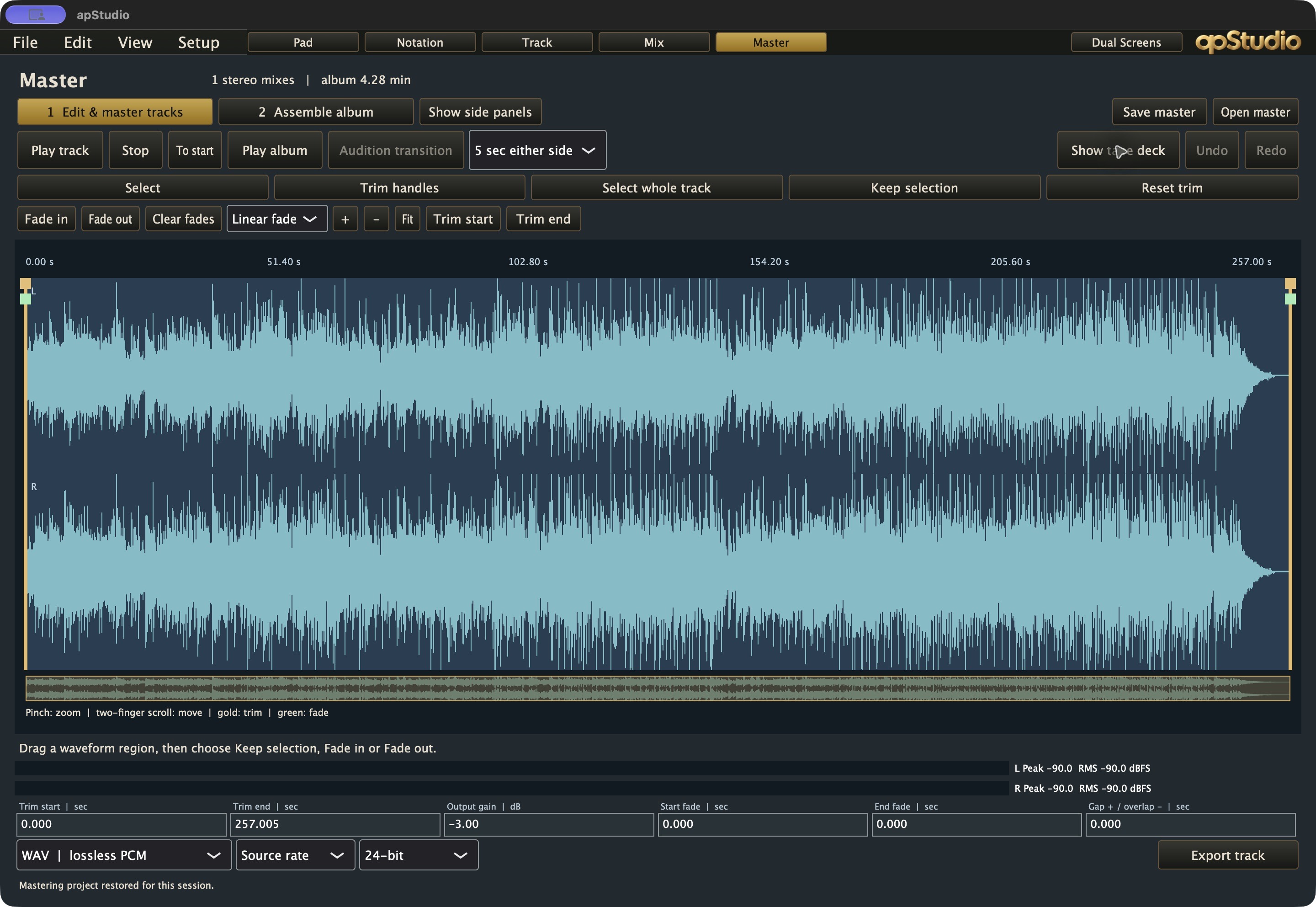
A real stereo mix in the mastering editor, with trim, fade, gain and export controls.
View full size ↗BRING YOUR FRIEND INTO THE SESSION
Want your friend to lay down a part? SessionCat connects their performance to your apStudio session with near-zero latency over a peer-to-peer connection.
Your side is already covered: SessionCat is built into apStudio for macOS. Your remote collaborator buys the standalone SessionCat app for $49 once to connect to you. They don’t need to buy apStudio. (But they will want to!)
No extra hardware. No subscription. Your collaborator keeps their license.
Check your connection free ↗ · Illustrated setup guide ↗
Standalone app: macOS 13 or later, Intel or Apple Silicon. Ethernet recommended. Actual latency depends on both connections and audio settings—test with your player before the session.
Bring more players into the picture: two separate licenses for $79 or five for $99. One-time purchases.
PROFESSIONAL · SELF-PACED LEARNING
Get 12 months of access to 13 professional courses for $99. Study recording, mixing, production and music business at your own pace, with lessons and practical assignments you can work through on your own schedule. Explore the courses below for their content, assessments and completion requirements.
COMING SOON · SBO+ EDUCATOR BENEFITS
Verified K–12 music educators with an active SBO+ subscription will receive the full professional apScore app for Apple silicon Macs free, plus apScore Online. The native app is a $199 value.
Eligible educators will also receive 50% off other eligible artistproMusic plugins and instruments. Courses and professional development are not discounted through this offer.
Qualify with a school or district email address and verify one school or district. Native apScore can be activated on up to two computers, including personal computers. Free access requires an active SBO+ subscription.
Prefer not to subscribe? A 50% discount on a paid apScore license for verified K–12 music educators is also coming soon. Purchased licenses remain yours if you do not subscribe.
Free educator signup and the updated offer are coming soon. Sign in to apScore Online.
Explore apScore ↗Teach recording, editing, mixing and live sound through practical work learners can explain, demonstrate and share. artistproMedia brings in-depth audio-production courses, professional studio tools, instructor preparation and practical assessment together for schools, colleges, continuing education and supervised workforce programs. Free SBO+ BOOST! supports eligible educators in planning lessons, performances and equipment.
Recording and mixing, live sound and event production, or a combined program. Begin with the six classroom foundation courses, then select specialist recording, processing, listening and music-business study by learner readiness.
Explore classroom pathwaysChoose named courses and instructor resources, then specify production tools, lab access and optional training in your institutional quote. Inspect actual lessons, practical work and assessment before adopting. BOOST! access is free for eligible, verified educators.
Explore teacher developmentAdvertised school licensing starts at $10 per student per year, with a 50-seat minimum. Request a quote to confirm eligibility, included courses and software, access and the total for your school. Purchase orders welcome.
Institutional licensingAUDIO PRODUCTION · INSTITUTIONAL ADOPTION
Capture, edit, mix, revise and deliver. Choose recording foundations and focused study in microphones, multitrack recording, mixing and processing, with instructor resources.
Review the studio routePlan systems, trace mains and monitors, run soundchecks, troubleshoot and operate supervised events. Separate foundation and specialist courses support practical career preparation.
Review the live-sound sequenceCombine selected studio and stage courses for a faculty-led program. Add critical listening, MIDI or publishing where the cohort needs them. Credit and credentials are determined by your institution.
Review the combined routeCLASSROOM FOUNDATIONS
Build recording portfolios, editable MIDI performances, safe live-sound plans, stage-ready rehearsals and listening evidence. Choose by demonstrated readiness, available equipment and teaching time. Each pathway links to its matching teacher course.
Browse additional courses, teacher materials and prerequisite guidance. Music Industry Career Pathways is in preparation.
TEACHER PROFESSIONAL DEVELOPMENT
Rehearse demonstrations, plan safe practical work, assess student evidence and adapt instruction. These six teacher courses match the classroom pathways above. Additional teacher guides appear with their related courses. Confirm local professional-development credit requirements with your institution.
Prepare your teachers to launch a selected course. Request a hands-on day covering lesson delivery, classroom equipment, practical demonstrations and assessment of student work. For a district rollout, discuss a sequence of training days and follow-up coaching. Your quote specifies the agenda, participant limit, trainer, preparation, travel and follow-up. Training is priced separately from annual licensing.
Discuss in-person trainingPROFESSIONAL MUSIC PRODUCTION TOOLS
Explore apStudio Online for browser recording, arranging and mixing, and apStudio native and artistpro plugins for desktop production. Practical course work identifies the tools needed; select software and lab access with your school license. Confirm platform compatibility, installations and access terms in the quote.
School use, personal desktop ownership and iOS app purchases have separate licensing terms.
STANDARDS & ASSESSMENT
Course maps connect assessed work and retained evidence to named standards. Review assignments, practical checks, rubrics and portfolio expectations alongside each course. Student music standards and teacher professional-learning frameworks serve different purposes.
Standards mapping does not establish state approval, accreditation, CTE designation or automatic CEU/PDP credit. Schools determine local adoption and credit.

SBO+ BOOST! · FREE CLASSROOM MANAGEMENT
Use SBO+ BOOST! to plan lessons, organize performances and manage your music program alongside the curriculum and teacher development you choose.
BOOST! is free for verified educators at eligible K–12 schools, colleges and universities. Choose the level of support your institution needs.
PLAN & TEACH
Organize lessons, standards, performances, music and equipment without creating student records.
MANAGE STUDENT WORK
Add school-authorized rosters, attendance, assignments, forms and individual equipment records to your teaching workspace.
SUPPORT YOUR TEACHERS
Share curriculum across your school or district, review teaching plans and help teachers coordinate their work.
ORGANIZE ADULT SUPPORT
Coordinate volunteers, fundraising, meetings and booster operations alongside your teaching program.
BOOST! access is free. Course and school licensing are separate. Student-enabled features require school authorization.
SCHOOL, COLLEGE & PROGRAM LICENSING

Tell us which student pathways, teacher professional development and production tools you need. Your quote should identify included course titles, student seats, teacher and administrator access, browser access, desktop lab installations, the license term and renewal terms.
Select a classroom pathway and its matching teacher preparation. Define the student seats, course materials, assessment resources and annual access in one itemized quote.
Plan courses across schools with a shared start date, teacher preparation and optional in-person training. Request district and multi-year terms with implementation costs shown separately.
For learning platforms, publishers and education providers: discuss licensing selected artistproMedia courses, accompanying teacher materials and assessment resources. Delivery, branding, rights, support and commercial terms are agreed for each partnership.
We take purchase orders. Buying for one school or an entire district? Get in touch. We’ll help you put together the right license and quote for your purchasing process.
50-seat minimum.
Get in touch about school licensing →Contact Sarah for institutional sales. Purchase orders welcome.
School starting price and inclusions must be confirmed in your quote. College and workforce cohort terms are quoted separately. This link prepares an email inquiry; it does not place an order.
ARTISTPRO MUSIC DEALERS
Sell artistpro plugins, instruments and collections through your own website and sales system. Keep the customer relationship and earn full dealer margins.
You make the sale. We deliver the license code in minutes. Your customer buys from your store. Once artistpro receives payment for the order, we deliver the code directly to the buyer.
Fully integrated with mmrOS POS for Square ↗. Connect your store’s sales to artistpro license delivery.
LET’S TALK


Get in touch about dealer pricing, products and getting set up.
Get in touch with Isaac →CHOOSE YOUR NATIVE STUDIO
The complete DAW with apRange console processing, the tape system, UPDD touchscreen mixing and SessionCat. Mix hands-on with compatible Raven hardware or other UPDD touchscreens using artistpro’s own integration.
apStudio native plus 60 separately usable plugins: studio processors, instruments, The Roger Nichols Collection and nine Shabby Road production tools.
apStudio native and all 140 desktop plugin products, plus 12 months of apStudio Online. Add the other 80 products for $133 more than Studio 60.
All three include perpetual desktop ownership and 12 months of updates. Everything also includes new plugin releases during those 12 months. Built-in DAW processing is included with the DAW and is not counted toward the 60 or 140 plugins. Everything includes 12 months of apStudio Online from purchase. apScore, iOS apps and courses are separate.
Your perpetual software doesn’t stop working when its update year ends. Keep the version you own, or renew updates when you choose.
Everything includes apStudio native and all 140 current desktop plugin products, 12 months of updates, and every new plugin released during those 12 months. Your desktop software is yours to keep. After the year ends, renew to continue receiving updates and new releases. apStudio Online is included for 12 months from purchase. apScore, courses and iOS apps are separate purchases.
Support varies by product. Check its product detail before purchase. Not every catalog entry has the same Intel, Apple Silicon, operating-system or host qualification. The lineup includes AU, VST3 and AAX versions, with standalone apps for selected products. Check the individual product for its available formats.
Everything: apStudio native + all 140 desktop plugin products for $399. The Roger Nichols Collection opening offer: $199, reduced from $249. Pick 3: three eligible individual plugins for $99 when that saves you money. WELCOME15: 15% off individual paid plugins and rigs. The better eligible offer applies; offers do not stack. Ordering is not yet open.
TRY BEFORE YOU BUY
Open apStudio Online, connect your audio input, record some parts and try the plugins. Start with your own performance or the Street Life multitrack session. Hear what they do before you decide.
Plugin and plugin-collection purchases are final. No refunds, except where required by law. Try the plugins before buying and check the system requirements for your computer and DAW. A browser demo lets you hear the sound; it does not verify desktop compatibility.
BOOKS · artistproMedia
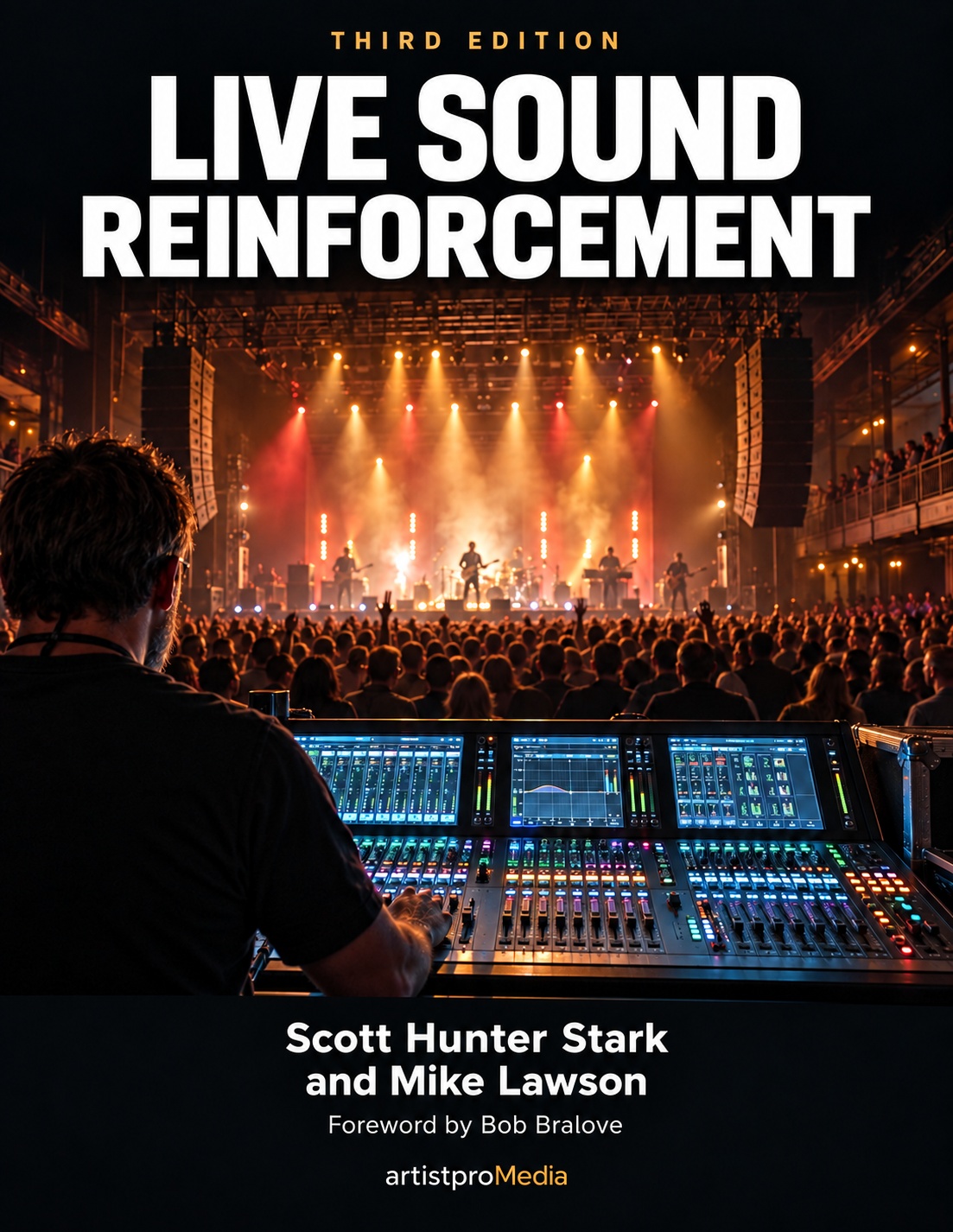
Live Sound Reinforcement, Third Edition, by Scott Hunter Stark and Mike Lawson. Thirty years of know-how, with new coverage of digital consoles, networked audio and in-ear monitoring.
Explore the book →